


Shortlist · Home office · 5 models
Best laptop stands for a home desk: five from a 6-ounce folder to a fixed aluminum riser, on lift and weight
A laptop on a desk puts the screen eight inches too low. A stand fixes that, and the only questions are how high it lifts, whether it moves, and whether you will type on the laptop while it is up — because none of them likes that. Five stands from a 6-ounce travel folder to a 3-pound block of aluminum, on the makers' lift, weight, fit and limits.
Quick answer
- A desk where the laptop stays putRain Design mStand — one piece of aluminum, 5.9 inches of lift, 3 lb, no wobble.
- up to 22inEye-level calls, folds for a bagTwelve South Curve Flex — lifts up to 22 inches, folds to 1.2, 1.8 lb.
- about 7inBudget riser that splits in twoNulaxy C3 — about 7 inches of lift, 10–16 inch laptops, two pieces.
- 6.5–12.5inTravelRoost V3 — 6 oz, folds to 1 by 1.5 by 13 inches, seven heights from 6.5 to 12.5 inches.
- 2–10.2inA 17-inch laptop, a shared deskBoYata N19 — 2 to 10.2 inches of lift and tilt, 11–17 inch laptops, 2.4 lb.
The five at a glance
| Model | Screen lift | Weight | Fits | Material | Width | Where to buy |
|---|---|---|---|---|---|---|
| Rain Design mStandfor a desk where the laptop stays put | No confirmed data | 3 lb | No confirmed data | Single piece of anodized aluminum | 10 in | View listing |
| Twelve South Curve Flexfor eye-level calls that folds for a bag | up to 22 in | 1.8 lb | Laptops at least 8.66 in wide, up to 7 lb | No confirmed data | 10.4 in | View listing |
| Nulaxy C3 Laptop Standfor the budget riser that splits in two | about 7 in | 1.8 lb† | 10–16 in laptops | 5 mm aluminum, two detachable parts | 11.5 in† | View listing |
| Roost V3 Laptop Standfor travel | 6.5–12.5 in | No confirmed data | All laptops, by Roost | No confirmed data | No confirmed data | View listing |
| BoYata Laptop Stand (N19)for a 17-inch laptop and a shared desk | 2–10.2 in | 2.4 lb | 11–17 in laptops | Aluminum alloy, silicone pads | 9.4 in | View listing |
Scroll sideways to see every column
† Figure from a retailer listing or otherwise awaiting confirmation from the manufacturer; other figures come from manufacturer manuals and spec sheets.
Lift figures are the makers’ own and are not all measured the same way: Rain Design and BoYata give the platform height, Twelve South the height of the top of the screen. The Roost’s weight is 6 oz and shows as such. The Nulaxy’s width, depth and weight are the listing’s and are marked pending.
Lift, weight and the typing problem
Three numbers decide a laptop stand. Lift, because the point is to bring the top of the screen to eye level, which for most people means 6 to 10 inches above the desk. Weight, because a stand that stays on a desk can weigh 3 lb and a stand that goes in a bag cannot. And the laptop it fits, which the makers state as a width or a size range.
The thing the numbers do not tell you is the one everyone discovers: you cannot type on a laptop on a stand. The keyboard ends up at chest height and the stand rocks. Nulaxy says this on its own page about the C3, and it is true of all of them. A stand is half of a setup; the other half is a keyboard and a mouse, and our small-desk guide covers where they go.
Rain Design mStand — for a desk where the laptop stays put
for a desk where the laptop stays put
Rain Design mStand
- Weight
- 3 lb
- Material
- Single piece of anodized aluminum
- Width
- 10 in
Check price on Amazon
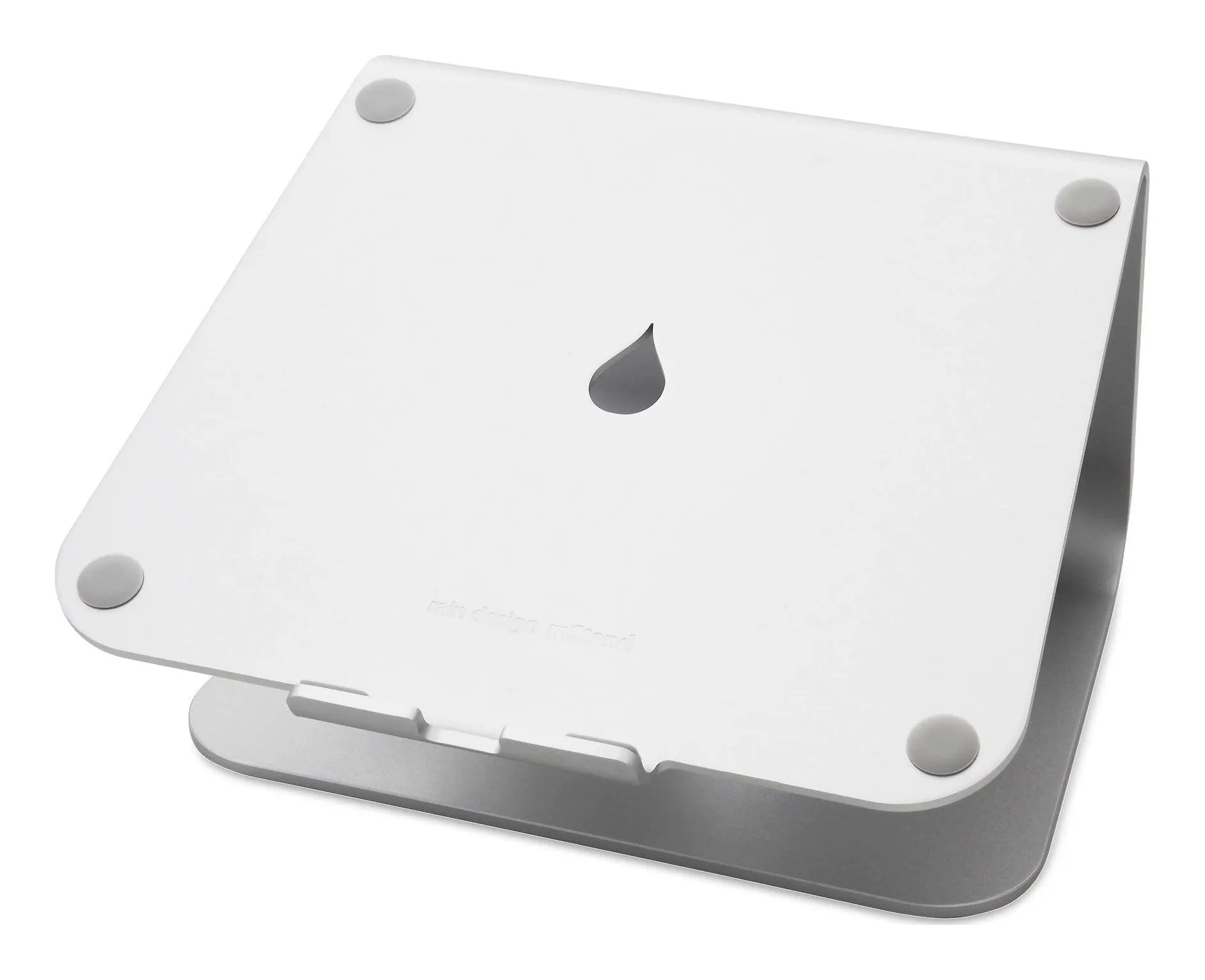
One curved sheet of anodized aluminum, 10 inches wide, 7.5 deep, 5.9 tall and 3 lb, with a 2-inch hole at the back for the charger cable, by Rain Design’s page. It has no hinges, no settings and no travel sleeve, which is the point: it does not wobble, does not loosen and does not move.
It is not adjustable, and 5.9 inches is a little low for a tall person, who ends up putting a book under it; at 3 lb it is not a bag stand.
For a permanent desk with an external keyboard and a 13 to 16 inch laptop used as a second screen, it is the one that disappears into the furniture.
Strengths
- Rock-steady — it is one piece of metal
- Cable hole keeps the charger lead tidy
- Raises a 16-in laptop to about eye level with an external keyboard
Limitations
- Not adjustable and not portable
- 3 lb
- Too low for a tall person without a riser underneath
Good for
- a permanent desk with an external keyboard
- a 13–16 in laptop used as a second screen
- anyone tired of folding stands flexing
Look elsewhere if
- travel
- a very tall user
- a desk where the laptop comes and goes
Twelve South Curve Flex — for eye-level calls that folds for a bag
for eye-level calls that folds for a bag
Twelve South Curve Flex
- Screen lift
- up to 22 in
- Weight
- 1.8 lb
- Fits
- Laptops at least 8.66 in wide, up to 7 lb
- Width
- 10.4 in
Check price on Amazon
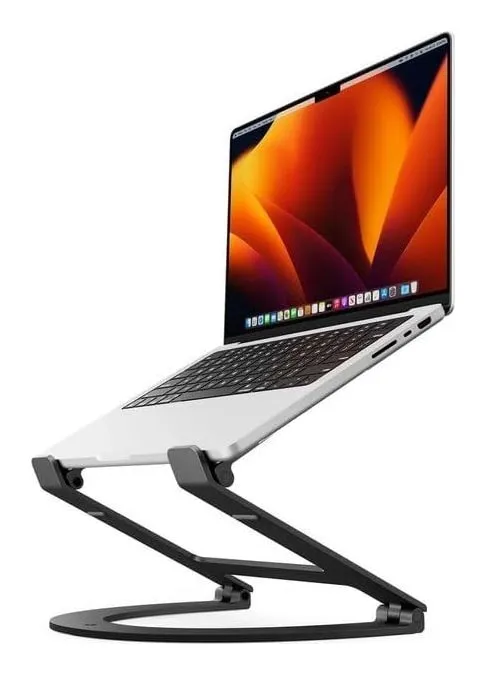
A folding aluminum stand that lifts the top of the screen as high as 22 inches, tilts from 0 to 45°, and folds to 10.4 by 8.8 by 1.2 inches at 1.8 lb with a travel sleeve in the box; it takes laptops at least 8.66 inches wide and under 7 lb, carries a one-year warranty, and the hinge tension adjusts with a supplied tool, all from Twelve South’s page.
At full height it flexes if you touch the laptop, it costs three or four times the Nulaxy, and a narrow 11-inch laptop is below its minimum width.
For calls at eye level, a laptop beside a monitor at matching height, or someone who moves between two desks, it is the one.
Strengths
- Lifts up to 22 in, the highest here
- Folds to 1.2 in and comes with a sleeve
- Hinge tension is adjustable with the supplied tool
Limitations
- At full height it flexes if you type on the laptop
- Costs three or four times the Nulaxy
- Needs a laptop at least 8.66 in wide
Good for
- eye-level video calls
- a laptop used beside a monitor at matching height
- someone who travels between two desks
Look elsewhere if
- typing on the laptop keyboard at height
- a tight budget
Nulaxy C3 — for the budget riser that splits in two
for the budget riser that splits in two
Nulaxy C3 Laptop Stand
- Elevation
- about 7 in
- Weight
- 1.8 lb†
- Fits
- 10–16 in laptops
- Material
- 5 mm aluminum, two detachable parts
- Width
- 11.5 in†
Check price on Amazon
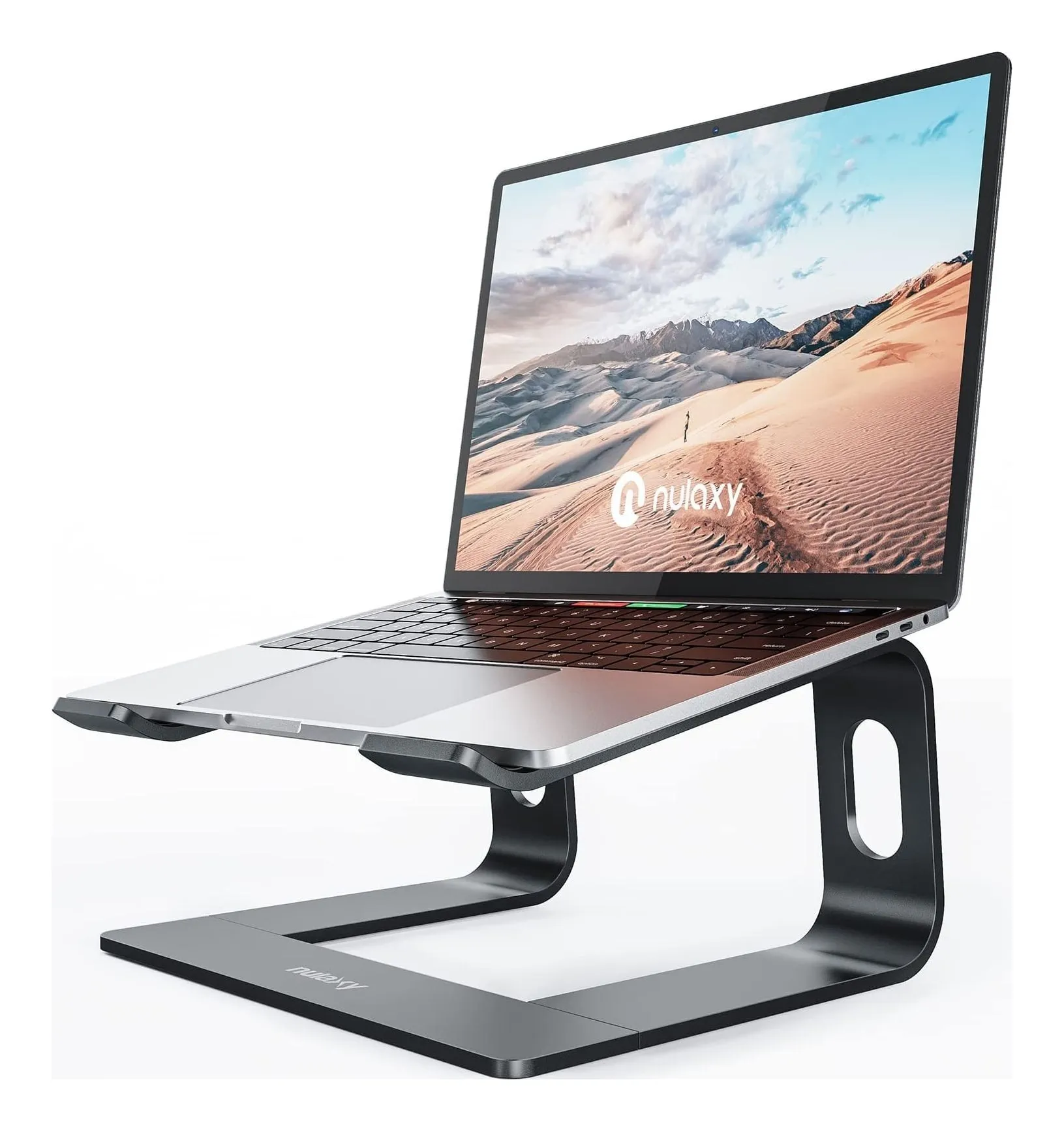
Two pieces of 5 mm aluminum that slot together into a riser with about 7 inches of lift, rated for 22 lb and for 10 to 16 inch laptops, with an open back for airflow and cables; Nulaxy’s page says plainly that it wobbles if you type on it. The listing gives 11.5 by 8.3 inches and 1.8 lb, which we mark pending.
Fixed height, that wobble, and listing-only dimensions.
For an external-keyboard desk on a budget, or a stand that goes home and back in a bag in two flat pieces, it is the cheap one that works.
Strengths
- Splits into two flat pieces for a bag
- 7 in of lift — enough for most people with a monitor beside it
- Open back for airflow and cables
Limitations
- Wobbles when typing on the laptop — Nulaxy says so
- Fixed height
- Dimensions and weight come from the listing
Good for
- an external-keyboard desk on a budget
- a stand that moves between home and office
- a 13–14 in laptop beside a monitor
Look elsewhere if
- typing directly on the raised laptop
- a 17 in laptop
Roost V3 — for travel
for travel
Roost V3 Laptop Stand
- Screen lift
- 6.5–12.5 in
- Fits
- All laptops, by Roost
Check price on Amazon
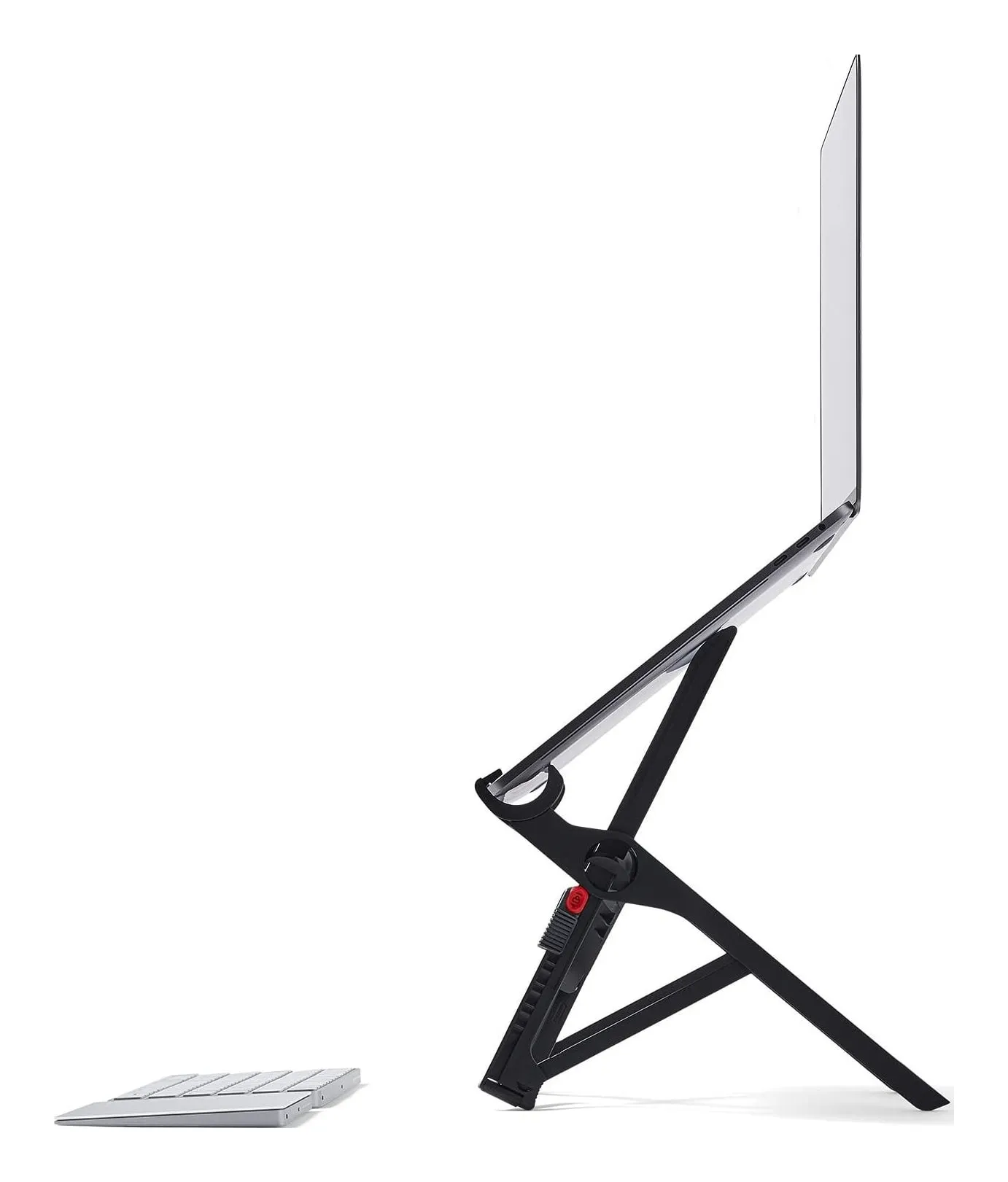
Six ounces, folded to 1 by 1.5 by 13 inches — a pencil case — and seven height settings that lift the screen 6.5 to 12.5 inches, gripping the laptop by its front edge, with a 90-day money-back guarantee, by Roost’s page. It is the travel stand every other travel stand is compared with.
It is expensive for a few ounces of plastic; it needs a keyboard and mouse every single time; and fat bezels or thick rubber feet can get in the way of the grips.
For cafés, trains and hotel desks, or a laptop that travels every day, nothing else here is close. For a fixed desk, buy the mStand.
Strengths
- 6 oz — you forget it is in the bag
- 12.5 in of lift puts the screen at eye level
- Seven height settings
Limitations
- Expensive for a few ounces of plastic
- Needs an external keyboard and mouse — always
- Grips the laptop by its front edge; fat bezels or rubber feet can interfere
Good for
- working from cafés, trains and hotel desks
- a laptop that travels every day
- a backpack with no room for an aluminum stand
Look elsewhere if
- a fixed desk — buy the mStand
- anyone who types on the laptop keyboard
BoYata N19 — for a 17-inch laptop and a shared desk
for a 17-inch laptop and a shared desk
BoYata Laptop Stand (N19)
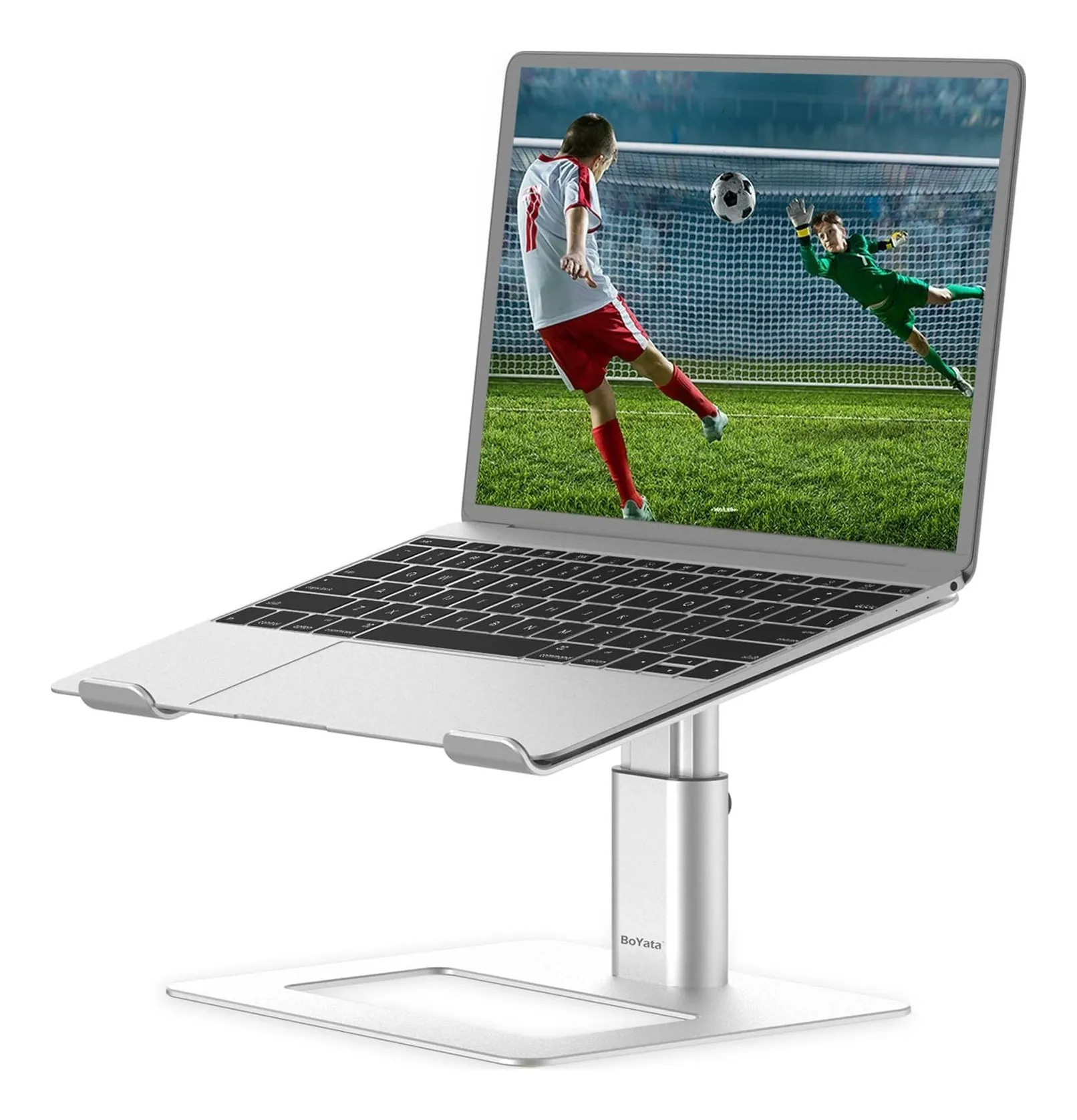
- Elevation
- 2–10.2 in
- Weight
- 2.4 lb
- Fits
- 11–17 in laptops
- Material
- Aluminum alloy, silicone pads
- Base width
- 9.4 in
Check price on Amazon
The adjustable aluminum stand with the widest range: 2 to 10.2 inches of lift and a tilting platform, 9.4 by 11.6 inches at the base, 2.4 lb, silicone pads, for 11 to 17 inch laptops, by BoYata’s page. It is the one here for a big laptop and for a desk used by people of different heights, or one that goes from sitting to standing.
At 2.4 lb and a hinge on each side it is not a travel stand, the hinges loosen over years of adjusting, and it looks industrial next to the mStand.
For a 16 or 17 inch laptop, or a sit-stand desk, it is the only adjustable stand here that takes it.
Strengths
- Lift from 2 to 10 in and tilt, both adjustable
- Takes a 17 in laptop
- Big silicone-padded platform
Limitations
- 2.4 lb and bulky — not a travel stand
- Hinges loosen over years of adjusting
- Looks industrial next to the mStand
Good for
- a desk shared by people of different heights
- a 16–17 in laptop
- someone who changes between sitting and standing
Look elsewhere if
- travel
- a minimalist desk
How to choose
- Does it move? Stays: mStand, BoYata. Bag between two desks: Curve Flex, Nulaxy. Every day: Roost.
- How much lift? 6–7 inches (mStand, Nulaxy) for most people; 10–12.5 (BoYata, Roost) for tall people or a low chair; 22 to the top of the screen (Curve Flex) for calls.
- Laptop size. 17 inches: BoYata only. Under 8.66 inches wide: not the Curve Flex.
- Weight. 6 oz (Roost) to 3 lb (mStand).
- Keyboard. Buy one. Every stand here needs it.
Who should buy a monitor instead
If you work from one desk every day, a 24-inch monitor costs about what the Curve Flex does and gives you a bigger screen at eye level with the laptop closed beside it, or open on a cheap riser as a second screen. A stand is for the laptop that has to be the screen: because you travel, because the desk is shared, or because there is no room for a monitor.
Which one, by situation
- One desk, forever: Rain Design mStand.
- Calls at eye level: Twelve South Curve Flex.
- Budget, external keyboard: Nulaxy C3.
- Every café and hotel desk: Roost V3.
- A 17-inch laptop, or a sit-stand desk: BoYata N19.
Sources
Facts checked October 10, 2026
- Rain Design — mStand product page — Manufacturer documentation, checked October 10, 2026
- Amazon listing (Rain Design) — Retailer listing, checked October 10, 2026
- Twelve South — Curve Flex product page — Manufacturer documentation, checked October 10, 2026
- Amazon listing (Twelve South) — Retailer listing, checked October 10, 2026
- Nulaxy — C3 Fully Aluminum Detachable Laptop Stand product page — Manufacturer documentation, checked October 10, 2026
- Amazon listing (Nulaxy) — Retailer listing, checked October 10, 2026
- Roost — Roost V3 laptop stand product page — Manufacturer documentation, checked October 10, 2026
- Amazon listing (Roost) — Retailer listing, checked October 10, 2026
- BoYata — adjustable ergonomic laptop holder (N19) product page — Manufacturer documentation, checked October 10, 2026
- Amazon listing (BoYata) — Retailer listing, checked October 10, 2026
How high should the screen be?
The top of the screen at or a little below eye level when you sit upright. For most adults at a 29-inch desk that means lifting a laptop screen 6 to 10 inches. The fixed stands here lift about 6 to 7 inches (mStand 5.9, Nulaxy about 7); the adjustable ones go to 10 (BoYata), 12.5 (Roost) and 22 (Curve Flex, measured to the top of the screen).
Can I type on the laptop while it is on the stand?
Not comfortably on any of them, and Nulaxy says so outright about the C3. A raised keyboard puts your wrists up and the whole stand rocks. The mStand is the steadiest because it is one piece of metal, but at 5.9 inches of lift the keyboard is still too high. Budget for an external keyboard and mouse with any stand.
Fixed or adjustable?
Fixed stands do not wobble and do not loosen; adjustable ones fit more people and more chairs. For one person at one desk the mStand or the Nulaxy; for a shared desk or a sit-stand desk the BoYata. The Curve Flex and Roost are adjustable because they travel.
Will my laptop fit?
Twelve South asks for a laptop at least 8.66 inches wide and under 7 lb for the Curve Flex; Nulaxy says 10 to 16 inches; BoYata 11 to 17; Roost says all laptops but grips by the front edge, so thick rubber feet can interfere; Rain Design publishes a 10-inch platform. A 16-inch MacBook Pro fits all five; a 17-inch gaming laptop fits only the BoYata.
Related reading
Shortlist · Home office
Best desk lamps for a home office: a monitor bar, a clamp arm for calls and three folding lamps, on the makers' lumens
A desk lamp does one of three jobs: lights the paperwork, lights the keyboard without glaring in the monitor, or lights your face for calls. No single lamp does all three. Five picks — a monitor light bar, a clamp arm with a swiveling head, two folding lamps and a USB gooseneck — compared on lumens, color temperature, power and footprint from the makers.
Guide · Home office
How to set up a small desk: screen height, light that does not glare, and where the keyboard goes
A small desk fails in a fixed order: the laptop screen is too low, so you hunch; the lamp is in the wrong place, so it glares; the keyboard has nowhere to go, so the stand comes off again. This guide fixes the three in order, with the measurements that matter and four products as worked examples — a fixed stand, a travel stand, a monitor bar and a clamp lamp that take no desk space.